


 9:41 AM
 Kelly Khoo

Recently, one of my laptops running Windows Vista shows "Logon Screen Saver stopped responding" error everytime I walk away from the laptop I return to a logon screen saver or a blank screen, and cannot get back to the screens I was using. I have to log off or restart the laptop.
After searching from the internet, this solution fixes my problem:
Since the problem is due to the Login Screen Saver, so I have decided to disable it, so that the laptop won't go into the logon screen saver when I away from the laptop.
Below are the steps to distable the Logon Screen Saver at the Registry level:
1. Logon the computer/laptop with an administrator account. If you are the only user using the computer/laptop, most probably your default logon username already have the administrator privileges.
2. Go to START -> RUN. Type regedit into the textbox and hit ENTER to launch the Registry Editor.
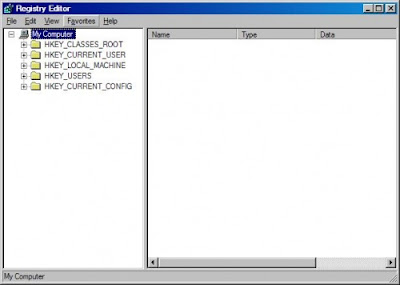
3. By double-clicking on the appropriate folders, Navigate to HKEY_USERS -> CONTROL PANEL -> DESKTOP. You should see:

4. Find "ScreenSaveActive" and "ScreenSaveTimeOut" from the rightmost panel. Set both values to 0. You can do this by double clicking on the words and entering the number 0 in the following pop-up window.
5. Close the Registry Editor.
IT DONE! No more "Logon Screen Saver not reponding" Error anymore.
After searching from the internet, this solution fixes my problem:
Since the problem is due to the Login Screen Saver, so I have decided to disable it, so that the laptop won't go into the logon screen saver when I away from the laptop.
Below are the steps to distable the Logon Screen Saver at the Registry level:
1. Logon the computer/laptop with an administrator account. If you are the only user using the computer/laptop, most probably your default logon username already have the administrator privileges.
2. Go to START -> RUN. Type regedit into the textbox and hit ENTER to launch the Registry Editor.
3. By double-clicking on the appropriate folders, Navigate to HKEY_USERS -> CONTROL PANEL -> DESKTOP. You should see:

4. Find "ScreenSaveActive" and "ScreenSaveTimeOut" from the rightmost panel. Set both values to 0. You can do this by double clicking on the words and entering the number 0 in the following pop-up window.
5. Close the Registry Editor.
IT DONE! No more "Logon Screen Saver not reponding" Error anymore.
 Posted in:


