Showing posts with label computer tool. Show all posts

Sunday, February 20, 2011

How To Open An UIF File

Have you download a UIF file and wondering how to extract/mount this file format so that you can view the content compress with UIF.

A UIF file is actually a MagicISO CD/DVD image file. In order to view the contents, you have to first mount the UIF image file. The other common option for a compressed image file is ISO. comparatively, UIF provides better encryption and also has better compression than ISO format.

There are two ways to decompress and extract the content:

1. MagicISO

Unfortunately, MagicISO is not a free tool. If you plan to use within 30 days, you can download the trial edition to depression UIF file. MagicISO can be downloaded from: http://www.magiciso.com/. After the installation of MagicISO, start it. Then click on Tools and Decompress UIF Image.


Choose the source file and the destination location for the ISO file.

2. UIF to ISO Converter

This method is slightly more complex. But, you can use it to extract large files, larger than 300MB. The MagicISO trial edition has a file size limiation of 300MB. Unless you want to pay for MagicISO, UIF to ISO converter is a free version that can be used to overcome the limitation of MagicISO trial edition.

For Windows:

1.Download UIF2ISO converter. Extract the downloaded zip file to get a folder of the same name. Then, run the setup to install the program.

2. Double-click on the UIF2ISO icon to launch the program. Then, locate the .uif file you want to extract and click “Open”.


3. Specify a ISO file name and confirm the conversion to start the converting process.

For Mac OS X: Download and use uif2iso4mac.

Once the UIF file being converted to ISO format, you can mount it using any virtual disk manager software or using the free unzip tool such as 7zip to extract the content.

Saturday, February 19, 2011

How To Monitor Your PC Or Laptop Temperature

Is your computer shutting down frequently without any notice? Most often, it happens after your leave your computer running for a while, and it just shut down without any message. One of the root courses of this symptom is your PC or Lapter is experiencing high temperature until it hits the the max allowable temperature. The computer will be automatically shutdown to protect the PC from overheating.

So, if you PC is experiencing the symptom of shutting down suddenly and frequently, most probably it is caused by high temperature. One way to confirm the issue it is to measure the temperature of PC or Laptop.

You don't to install a thermometer at your PC or laptop. One of the best ways to monitor is to install temperature reading software that might help you actually know if the problem is causing by overheating. Coretemp is a tiny application which is low on resources and is surprisingly accurate in providing the PC or laptop temperature in real-time. It works by communicating with the built-in digital thermal sensor (DTS) on latest Intel and AMD processors.


It is a tiny but extremely powerful and accurate program which tells you the temperature of each core simultaneously and can be easily installed on Windows 7, Windows Vista and Windows XP. Coretemp can be download at http://www.alcpu.com/CoreTemp/.


In the above example, CoreTemp reads the temperatue on Duo Core Intel PC. Tj Max is the maximum allowable temperature. If any of core temperature hit Tj Max, the computer will be shutdown automatically to pretect the PC from overheating. The above example, the Cores are measured at 69 deg. C to 70 deg. C, showing that this PC is experiencing an overheating issue.

Tuesday, February 15, 2011

How To Reinstall Trial Software After Trial Period Has Expired

There are a few methods to resinstall and reset the trial period of a trial software:

Method 1: Backup The Registry

Most trial software add a registry key to track it validality. When you uninstall a software, the registry key will not be removed. So, if you have removed a trial software and try to reinstall again, you wont be able to reset the trial period as the software found the registry key created in your previous installation and gives you a message like for e.g, "Your trial period has expired".

So the best way to re-used a tria software is: Backup your computer registry before install any trial software so that you can restore the registry, the one without the trial software key and enable you to reset the trial period again. See how to backup and restore computer registry.

Method 2: Use Process Monitor

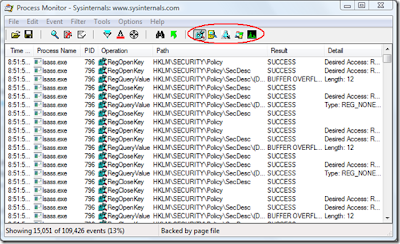
Process monitor is a small window tool created to let computer users to monitor their computer activities in real time. With process monitor, activites such as real-time file system, registry and process/thread can be monitored. With this you can see which applications are accessing your Registry, which keys they are accessing, and the Registry data that they are reading and writing – all in real-time.


Note: The Process Monitor will show all activities by default. You can use the toolbar, circled in RED to filter out all activities except the registry activities for easy of tracking purpose.

Then, run the Process Minitor and install the trial software, see which registry being added or monidifed, and note down the name and the path of the key. Once the trial software expired, you can revert back the trial period by modifying the key and set them back to the value as you recorded during the trial software installation.

Update: There is a small tool called: Little Registry Cleaner that you can use to clear up invalid/broken registry items, in this way it can clean up all traces of a program.

 
Design by Free WordPress Themes | Bloggerized by Lasantha - Premium Blogger Themes | cna certification